

Solid Edge & HEEDS
Two tools at opposite ends of the workflow: Solid Edge builds the design at moderate cost; HEEDS automatically runs hundreds of options to find the best configuration.
Two tools, two roles
Solid Edge — building the design
Capable enough for most mechanical equipment at a lower cost than NX. It suits a medium-sized design team, or an organization beginning to standardize its 3D workflow.
HEEDS — finding the best option
It plugs into any simulation package, changes the parameters, runs, reads the results and decides where to go next. The engineer sets up the problem once, and the runs proceed unattended.
Balancing several objectives at once
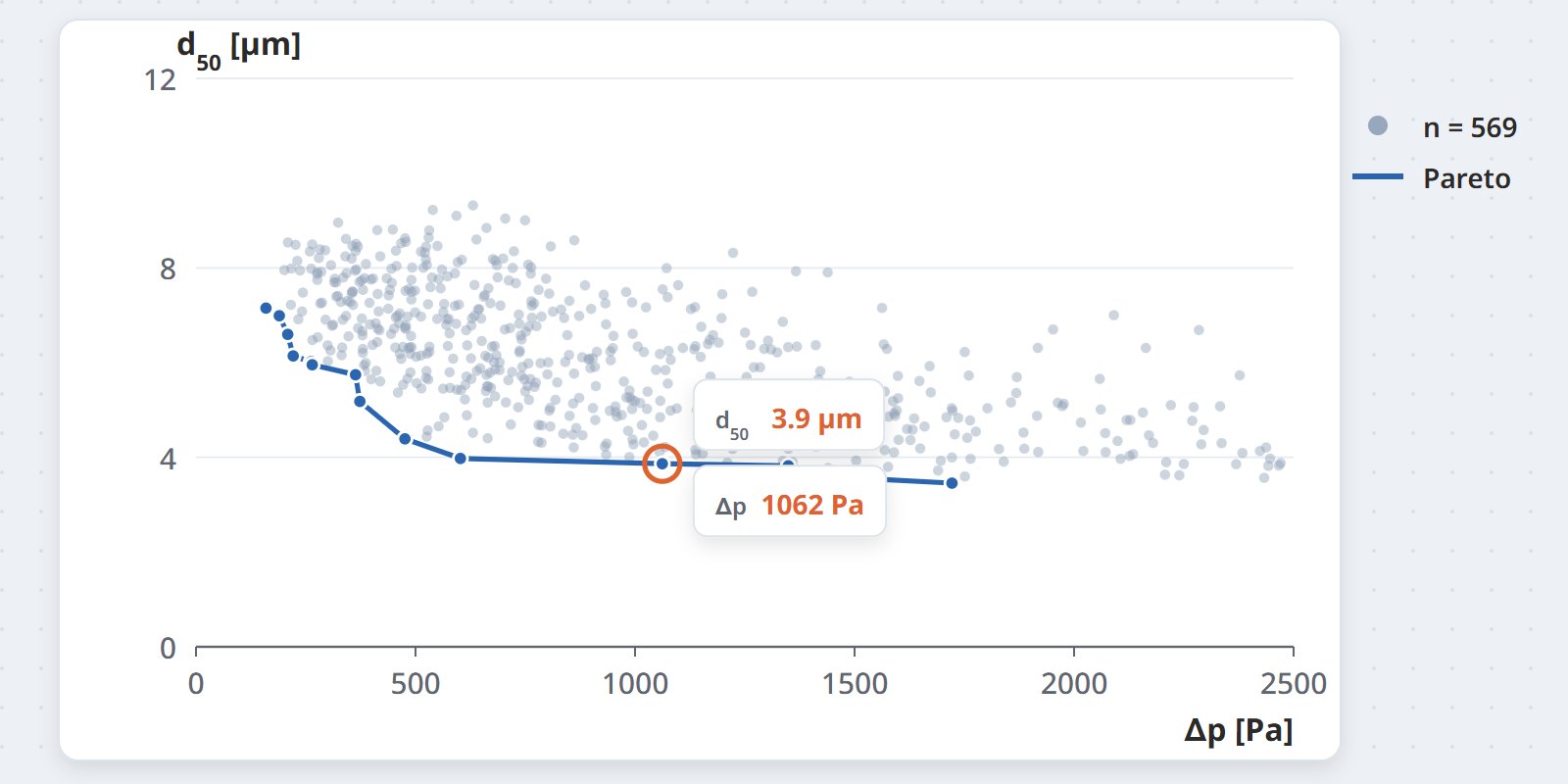
A real design rarely has a single criterion — usually efficiency, pressure loss, mass and cost have to be balanced. HEEDS returns a set of optimal options for you to choose from.
Applications
- Finding the best configuration — injector positions and angles, the number and layout of flow-guide plates
- Balancing efficiency against losses — improving treatment efficiency without pushing pressure loss too high
- Reducing structural mass — keeping the strength while using less material
- Generating training data — a set of options covering the parameter space evenly for a reduced-order model
Coupled tools
NX CAD
The parametric geometry platform HEEDS drives to change dimensions automatically.
View details →Applications at CFDWAYS
- Sweeping injector positions on SNCR problems instead of trying a handful of options by hand
- Finding a flow-guide layout that balances distribution uniformity against pressure loss
- Preparing an option data set for a digital twin
Licensing & support
Solid Edge is sold by configuration like NX, but at a lower price point. HEEDS is licensed by the number of parallel processes: the more options run simultaneously, the more licenses are needed.
- Solid Edge: from a basic design version to one with integrated simulation
- HEEDS: a base license plus parallel processes, usually alongside HPC infrastructure
Optimization is meaningful only when the base model is reliable; the model must be calibrated before HEEDS is run.
Talk to us before investingFrequently asked questions
Can Solid Edge replace NX?
For most mechanical equipment, Solid Edge is sufficient. NX has the advantage on very large assemblies and in its integration with Simcenter, which makes it the better choice when design and simulation are iterated continuously.
How many machines does HEEDS need?
It depends on how long each simulation run takes. A 2-hour case swept over 200 options needs an HPC cluster running in parallel — CFDWAYS estimates the required configuration before you invest.
Is HEEDS required for design optimization?
No. Many problems need only a few dozen options swept with a macro. HEEDS is worth the investment when the parameter space is large and you do this kind of work regularly.
Plan a design option sweep
Describe the parameters you want to sweep — CFDWAYS will estimate the number of runs and the time required.